MS Windows extension tool over DRBL environment
Free Software Labs , NCHC ,Taiwan
GPL
ceasar _at_ nchc org tw, steven _at_ nchc org tw
*******************************************************
| Download | Installation | Other tool | Screenshot | Documents | i18n | Forum | Mail List |  |
Credits |
Page Index
- Download
- Installation
- How to configure Windows HOSTNAME format via DRBL-Winroll ?
- How to configure WORKGROUP name via DRBL-Winroll ?
- How to auto-setup Network Configuration ?
- How to auto-add to AD domain
- How to setup Monitor daemon for Windows clients
- How to renew MS Windows SID ?
- How to make Windows clients to accept the commands form DRBL server automatically ?
- Language Supports
- Others
DRBL-Winroll is a tool that enables MS-Windows client to accept commands from DRBL server, and it resolve windows hostname, SID duplication problem via using image clone tool at single local LAN.It can also adjust "workgroup" name and Windows network configuration automatically.
Feature :
- Adjust Windows hostname, workgroup name, SID automatically
- Provide network auto-setup function
- Provide auto-add to AD domain functionNEW from v1.3.0
- Prodive system monitor service in Windows clientsNEW from v1.3.1
- Install sshd service
- Compatible with other image clone tool (like: Clonezilla, Ghost, Acronis True Image, .etc) to be able to restore large-scale windows system by utilizing one template image
- DRBL-Winroll itself is licensed under GNU GPL
- It incorporates code from wsname and newsid porjects, each of which has its own license terms
- Standard disclaimers apply
- Download
- Stable Version : [Donwload]
- Testing Version: [Download]
- Note :
- Installation
- EXE:
- Download drbl-winroll-setup-x.x.x-setup.exe then execute it
- ZIP:
- Unzip the package : drbl-winroll-x.x.x-setup.zip
- Execute the "winroll-setup.bat" , and the program will lead to complete installation
- Note :
- Please install the package with Administrator(s) privelege (Option: Make sure Internet connection is work fine if you need install newsid program from Internet)
- Please remove cygwin if you had installed it before; Or, use 『Install over』 option to install
- For Vista or Windows 7/2008 OS, please refer here to disable UAC function before installation。If you still need UAC function, please re-enable it after installtion.
- How to configure Windows HOSTNAME format via DRBL-Winroll ?
- [Programs]-> [Cygwin]-> [drbl_winroll-config] , to edit "winroll.conf"
- Find out the follow line then replace the parameter : HN_WSNAME_PARAM = xxxx
- Advaced mode : By config file
- How to configure WORKGROUP name via DRBL-Winroll ?
- By fix string , ex: WG
- By IP/Netmask, ex: GROUP-$NM Use Windows IP address compared with Netmask and add a prefix string : "WG" (you can edit it in winroll.conf) as WORKGROUP name, ex :
- By DNS Suffix : $DNS_SUFFIX DNS SUFFIX is one of IP information from DHCP service. On this option, DRBL-Winroll would use the fisrt two string (ex: get "nchc.org" form "nchc.org.tw") then replace "." with "-" (ex: "nchc.org" -> "nchc-org" ). You can use "ipconfig /all" command to show "DNS Suffix " information on Windows OS.
- How to use auto-setup Network Configuration via DRBL-Winroll ? DRBL-Winroll provide 3 options to setup Windows network automatically. Open [Programs] -> [Cygwin]-> [drbl_winroll-config] , find out the follow parameter and edit it in "winroll.conf" CONFIG_NETWORK_MODE = xxxx
- DRBL-Winroll use DHCP as default for Windows clients
- Advanced mode : By config file Make sure CONFIG_NETWORK_MODE = /RDF:C:\cygwin\drbl_winroll-config\client-mac-network.conf in winroll.conf,
- There two samples for network cofiguration in c:\cygwin\drbl_winroll-doc\sample\
- How to setup auto-add to AD domain function ?
- Follow the installation step and input necessary information (AD domain name, valid user account and password)
- After mass deployment, clients would show the message of domain modification and reboot by themself. As the right image show :
- What to setup : After it added the audo-add to AD function, system would add a batch file "add2ad.bat" in 'c:\cygwin\drbl_winroll-config\'. The contents as the follow:
netdom join %computername% /domain:[DOMAIN] /userd:[USER] /passwordd:[PASSWORD] /reboot:8
- How to work :Client will execute the batch file untill system is ready (it means to already done for hostname fix, network environment...). If it succeeds, system would delete the batch file automatically for security issue (due to user account and password) and create a new file "c:\cygwin\drbl_winroll-config\add2ad.md5". It records a value that the md5sum result for this machine's phyical address of NIC
- System use netdom.exe command to do the auto-add to AD function. So, please make sure netdom.exe is ready in it. (Suggest to test if netdom.exe command works under command mode) Windows XP : please refer here
- For do the mass deployment, please DO NOTadd to AD domain before you image it as a template. It also avoid to reboot it into Windows system after DRBL-winroll installation (Because that will lead to client add to AD domain too)
- Need to renew SID ? Clients don't need to renew SID if it use Windows 2003 (or later) as AD server. It can work fine that clients have different hostname but the same SID in domain. Of course, DRBL-winroll can do it after clients renew SID if necessary
- How to setup system monitor service for Windows clients ? DRBL-winroll integrate Munin Win32 project as system monitor/ tool. Munin is a networked resource monitoring tool with server-client architecture. The explanations of insatllation and configuration would be presented in two parts : client site and server site.
- Client site
- During installing, it would query if to install system monitor service. Please type "y" then press [Enter] (default by 'No'). The "Munin Node for DRBL-winroll" installer will popup and start to install daemon, show as follow:

Munin Node for DRBL-winroll Installer - Follow the steps to complete installation
- Server site
- For example : use Ubuntu Lucid, suggest to pre-install apache2 to easy view the reports of clients system via web, then install munin package, as the follow
- Download DRBL-winroll Server-site package server-site-*.tgz then unpack it.Excute gen_munin_clients_conf.sh to collect clients' informaction as configuration file. As the follow :
- Script would get ip/hostname of clients for report via user assignment, then output to a configuration for Munin, named: "munin-winroll-clients.conf" . It would help user to configure and restart crontab in server for supported Linux distribution. As the follow:
Get ip list from DRBL server [Y/n]y
Domain name [domain.localdomain]
Set domain name as : domain.localdomain ...
Get clients hostname via Munin service ? Default from local /etc/hosts [N/y]
Still to keep the record if get hostname fail (to use ip as hostname) [N/y]
get hostname of '192.168.101.1' :PC101
get hostname of '192.168.101.2' :PC102
get hostname of '192.168.101.3' :PC103
Total 3 record(s) done in 'munin-winroll-clients.conf'
Please copy the file into correct folder for Munin (ex: /etc/munin/munin-conf.d) then restart munin daemon (ex: $ sudo -u munin munin-cron)
- If need, please copy the configuration file into correct directory for Munin server (ex: /etc/munin/munin-conf.d in Ubuntu Lucid ) then restart munin-cron to create necessary data for report. As the follow:
$ sudo cp munin-winroll-clients.conf /etc/munin/munin-conf.d ; sudo -u munin munin-cron
- Where to view report It would be easy to view the report by web page via http://localhost/munin on monitor server. By default, Munin report web only be accessible from localhost. Please refer Munin document for details about remote access and security issue.
- Acknowledge :Thansk to Munin Nodes win32 project. DRBL-winroll do repackage the installer via NSIS. Users can refer the NSIS configuration in ~/drbl-winroll/tool/munin-node-winroll.nsi if needs
- How to renew MS Windows SID ?
- Please choose (and pre-download) your renew sid tool that support to run as command mode, ex:NewSID v4.10; Answer 'y' to setup "SID-check" service, give the full path of tool (an executable file) and the appropriate parameters for it(ex: use '/a /n' for newsid.exe). As the follow :
- Service would record NIC mac address of Windows machine, it would give a new SID if service discover a new one mac address.
- For security reason , SID should be given randomly, And service would encode the mac address what it discover via md5sum
- DRBL-Winroll would startup first time after installation finished if you did setup 'SID-check' service. Please wait until system reboot by itself.
- How to make Windows clients to accept the commands form DRBL server automatically ? If you want to your windows clients can accept the commands from DRBL server, please follow the step:
- Switch to root in your DRBL serer. Make sure do "id_rsa" and "id_rsa.pub" exist in /root/.ssh , jump to stpe 3 if yes.
- Create root's ssh keys (private and public key) , and press [Enter] when it asks "passphrase " ( mean no passphrase)
- It would create "id_rsa" and "id_rsa.pub" in /root/.ssh, ex:
- "Copy" (ex: use "scp" command or usb flash) id_rsa.pub from DRBL server to Windows and save the file name as "authorized_keys" in Administrator's .ssh folder of cygwin home directory (c:\cygwin\home\administrator\.ssh), ex :
c:\your\windows\path> copy [path-of-id_dsa.pub] c:\cygwin\home\administrator\.ssh\authorized_keysOr use "ssh-copy-id" command on DRBL server to transmitsudo ssh-copy-id -i ~/.ssh/id_rsa.pub administrator@[win-client-ip]
- you can test the result via to send a command from drbl server to MS-client. It would not ask password if you setup the above steps correctly ,ex:
- After all, you can send a command to clients from DRBL server via "/opt/drbl/sbin/dcs" command.
- Except Windows NT and Windows XP, DRBL-winroll would create a new account "cyg_server" as ssh daemon runner. So, please DO NOT change its password or disable it. That would lead to ssd daemon be out of service.
- For security issue, its password be created by random with 8 strings and be stored in "C:\cygwin\drbl_winroll-config\SSHD_SERVER_PW.txt" file。
- Language Support
- DRBL-winroll suppports the follow languages, and thanks the people's effort in language transaltion and testbed report !!
- Traditional Chinese
- English
- French : Joël Gondouin (joel_at_gondouin_net)
- Dutch : Dave Haakenhout (Almere, Netherlands)
- Swedish : Yngve Spång (Systemkonsult AB)
- Spanish : Artz Neo (artzneo_at_linuxmail_org)
- Help us to translate !![How to]
- Other
- Text FAQ : [ Chinese ][English ]
- Web FAQ : Read here
- History : Read here
- Other Tools
- [Stable]
- EZ command sender : EZ-commands
- [Testing]
- User desktop recover tool : winroll-recover
Support : Windows 2000/ Windows XP/Windows 2003/Vista/Windows 7/Windows 2008
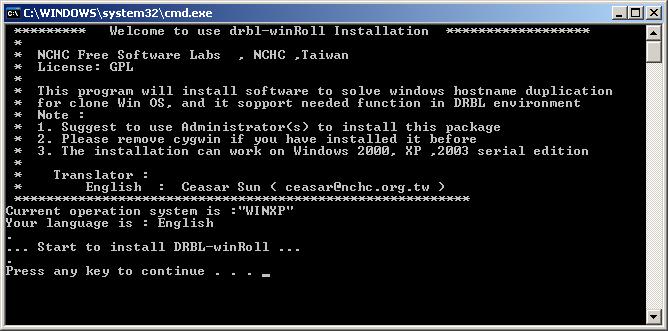
Start to install DRBL-Winroll
By default, DRBL-winroll use the last six numbers of IP with one prefix string : "PC" as HOSTNAME for Windows, ex:
IP is 192.168.1.52 , the its hostname would be : PC-001-052
You can follow the steps to change HOSTNAME format :
IP is 192.168.1.52 , the its hostname would be : PC-001-052
You can follow the steps to change HOSTNAME format :
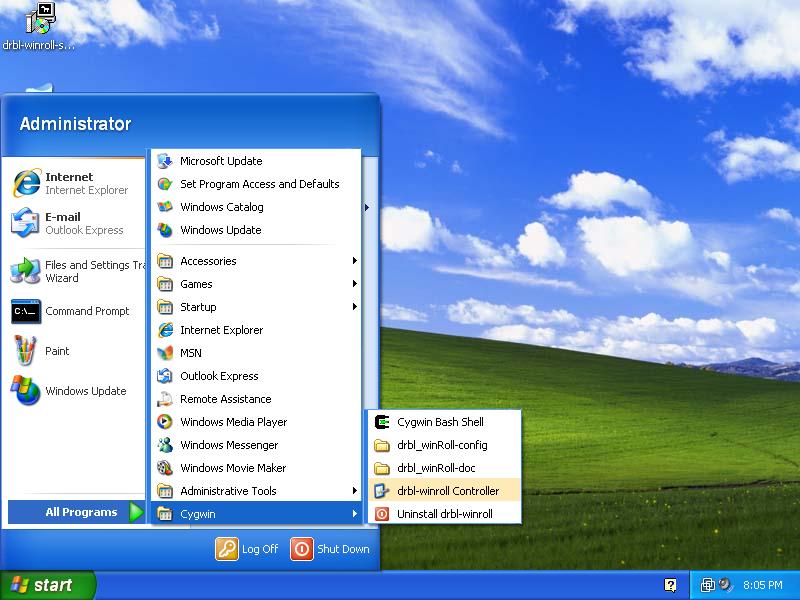
The parameter guide is as follow :
# HN_WSNAME_PARAM = /N:PC-$ZFIP[3+] (Last IP (ex:192.168.1.52) 3 chars with zero-filled, got:'PC-052'. Due to IP string became to '192-168-001-052';As default vaule.)
# HN_WSNAME_PARAM = /N:PC-$ZFIP[4+] (Last IP 4 chars with zero-filled, got:'PC--052')
# ----- Other common parameters
# HN_WSNAME_PARAM = /N:PC-$MAC (ex: PC-000C294EEF53)
# HN_WSNAME_PARAM = /N:PC-$MAC[+8] (First 8 codes of Mac Adress ", ex: PC-000C294E)
# HN_WSNAME_PARAM = /N:PC-$IP[3+] (Last 3 characters of IP, got: 'PC--52'. Due to IP string became to '192-168-1-52')
# HN_WSNAME_PARAM = /N:PC-$IP[4+] (Last 4 characters of IP, got: 'PC-1-52')
# HN_WSNAME_PARAM = /N:PC-$ZFIP[4+] (Last IP 4 chars with zero-filled, got:'PC--052')
# ----- Other common parameters
# HN_WSNAME_PARAM = /N:PC-$MAC (ex: PC-000C294EEF53)
# HN_WSNAME_PARAM = /N:PC-$MAC[+8] (First 8 codes of Mac Adress ", ex: PC-000C294E)
# HN_WSNAME_PARAM = /N:PC-$IP[3+] (Last 3 characters of IP, got: 'PC--52'. Due to IP string became to '192-168-1-52')
# HN_WSNAME_PARAM = /N:PC-$IP[4+] (Last 4 characters of IP, got: 'PC-1-52')
DRBL-winroll also provide to setup HOSTNAME by a config file from local. Please edit "HN_WSNAME_PARAM = xxxx " as the follow:
HN_WSNAME_PARAM = /RDF:C:\cygwin\drbl_winroll-config\hosts.conf /DFK:$MAC
Note: /RDF define the path of local file, /DFK define the field for searching key
A ref erence format in hosts.conf is : "IP or MAc Address" = "hostname" , the follow for more detail :
00-0C-29-4E-EF-53 = Student-01 # (Assign "Student-01" as hostname if its MAC address is 000C294EEF53 )
192-168-1-12 = Student-02 # (Assign "Student-02" as hostname for IP address is 192.168.1.12 client. Replace dot '.' symbol with dash '-')
192-168-1-12 = Student-02 # (Assign "Student-02" as hostname for IP address is 192.168.1.12 client. Replace dot '.' symbol with dash '-')
Note: Hostname would be assigned as "Student-01" via /DFK:$MAC ; /DFK:$IP it would be "Student-02"
By this way, mananger can define hostname free! But we suggest you to collect all MAC address in template macine first. The other cloned machines would be named hostname automatically.
PS:
In DRBL-Winroll, it changes the hostname by wsname tool. So the format of hostname we provide is fully consistent with wsname tool so far.
In DRBL-Winroll, it changes the hostname by wsname tool. So the format of hostname we provide is fully consistent with wsname tool so far.
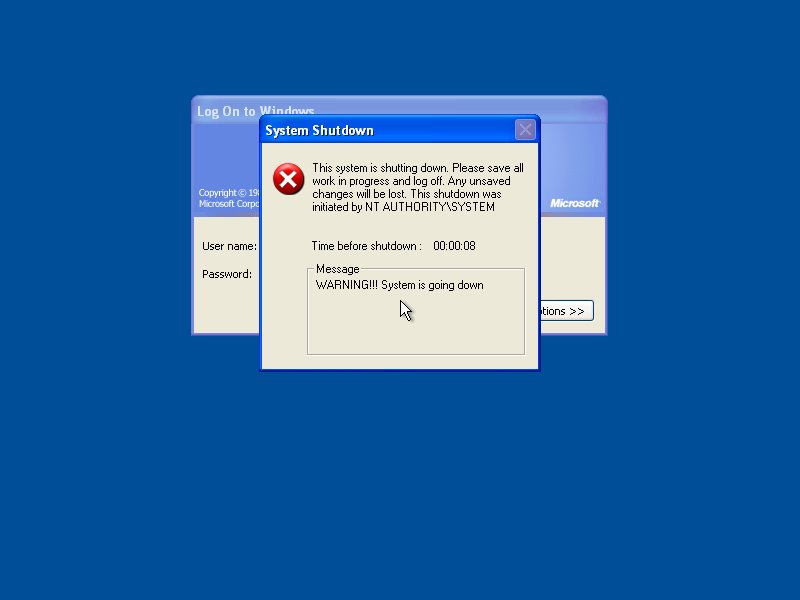
Windows have to reboot if its HOSTNAME or WORKGROUP be changed
DRBL-winroll provides three options :
ip:192.168.20.2 NM:255.255.255.0=> workgroup will be "GROUP-020"
ip:172.18.1.5 NM:255.255.0.0 => workgroup will be "GROUP-018-001"
ip:172.18.1.5 NM:255.255.0.0 => workgroup will be "GROUP-018-001"
DNS Suffix Search List. . . . . . : my.org.domain=> WORKGROUP will be "WG-my-org"
Note :
DRBL-Winroll use FIX STRING "WG" as default format for WORKGROUP
DRBL-Winroll use FIX STRING "WG" as default format for WORKGROUP
The parameter guide is as follow :
CONFIG_NETWORK_MODE = dhcp (use DHCP method)
CONFIG_NETWORK_MODE = /RDF:C:\cygwin\drbl_winroll-config\client-mac-network.conf (By config file from local)
CONFIG_NETWORK_MODE = none (skip network configuration, even no use dhcp )
CONFIG_NETWORK_MODE = /RDF:C:\cygwin\drbl_winroll-config\client-mac-network.conf (By config file from local)
CONFIG_NETWORK_MODE = none (skip network configuration, even no use dhcp )
then edit c:\cygwin\drbl_winroll-config\client-mac-network.conf
The follow is a sample for client-mac-network.conf :
_DEFAULT_NETWORK	= 192.168.100.254/24  # assign network and netmask
_DEFAULT_GATEWAY	= 192.168.100.254		# assign default gateway
_DEFAULT_DNS		= 168.95.1.1	# DNS, it could be empty, one or many values (use "comma"(,) as separated )
_DEFAULT_WINS		= 192.168.100.1	# WINS, it could be empty, one or many values (use "comma"(,) as separated )
_DEFAULT_DNS_SUFFIX	= # DNS_SUFFIX, it could be empty,

subnet 10.0.2.0/8 {
	THIS_GATEWAY	= 10.0.2.2 # use 10.0.2.2 as default gateway for this network
	THIS_DNS	= 10.0.1.1	# use 10.0.1.1 as default DNS for this network
	THIS_WINS	= 		# Use nothing as  _DEFAULT_WINS value
	# This subnet would inherit the "_DEFAULT_DNS_SUFFIX" value form global settings
	# because no set value for it in this session
}

subnet 192.168.0.0/24 {
	THIS_GATEWAY		= 192.168.0.254
	THIS_DNS			= 192.168.0.1
	#THIS _WINS
	#  This subnet would inherit "_DEFAULT_WINS" and
	# "_DEFAULT_DNS_SUFFIX" value form global settings
}

[IP Address]
00-00-00-00-00-01 = 192.168.100.11
00-00-00-00-00-02 = 10.0.2.30  # it would use settings of subnet 10.0.2.0/8
00-00-00-00-00-03 = 192.168.0.7  #  it would use settings of subnet 192.168.0.0/24
00-00-00-00-00-04 = dhcp  # uses dhcp
00-00-00-00-00-05 = none  # skip this NIC
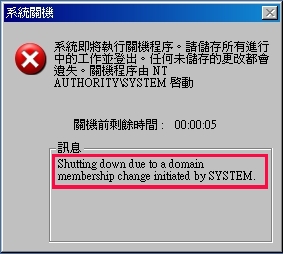
Explanation :
Note :
Windows Vista : please refer here
Windows 7/Server 2008 : please refer here
sudo apt-get install apache2 munin munin-node
$ tar xzf server-site-v167.tgz ; cd server-site ; sudo ./gen_munin_clients_conf.sh
Note :
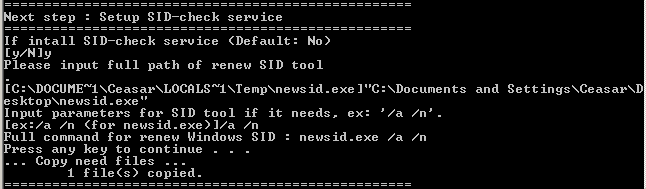
Setup 'SID-check' service
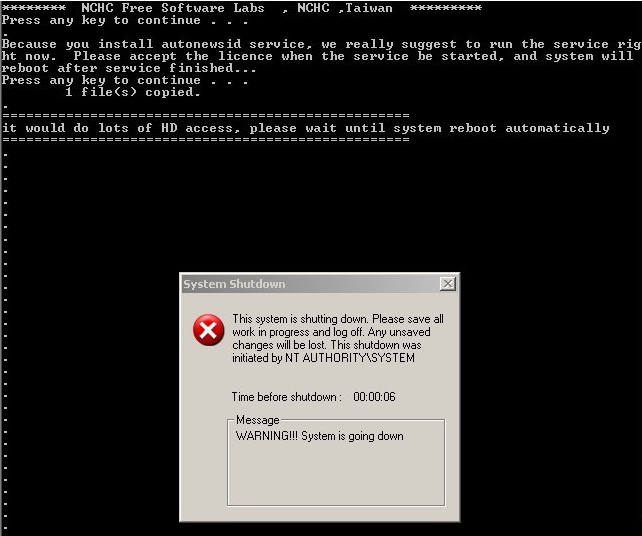
Firt time to start SID-check service after installation and wait until system reboot by itself
$ ssh-keygen -d
Generating public/private rsa key pair.
Enter file in which to save the key (/root/.ssh/id_rsa):
Enter passphrase (empty for no passphrase):
Enter same passphrase again:
Your identification has been saved in /root/.ssh/id_rsa.
Your public key has been saved in /root/.ssh/id_rsa.pub.
The key fingerprint is:
fe:56:XX:XX:XX:XX:XX:XX:XX:XX:83:ff:42
root@drbl-server
Generating public/private rsa key pair.
Enter file in which to save the key (/root/.ssh/id_rsa):
Enter passphrase (empty for no passphrase):
Enter same passphrase again:
Your identification has been saved in /root/.ssh/id_rsa.
Your public key has been saved in /root/.ssh/id_rsa.pub.
The key fingerprint is:
fe:56:XX:XX:XX:XX:XX:XX:XX:XX:83:ff:42
root@drbl-server
$ ls /root/.ssh
id_dsa id_dsa.pub
id_dsa id_dsa.pub
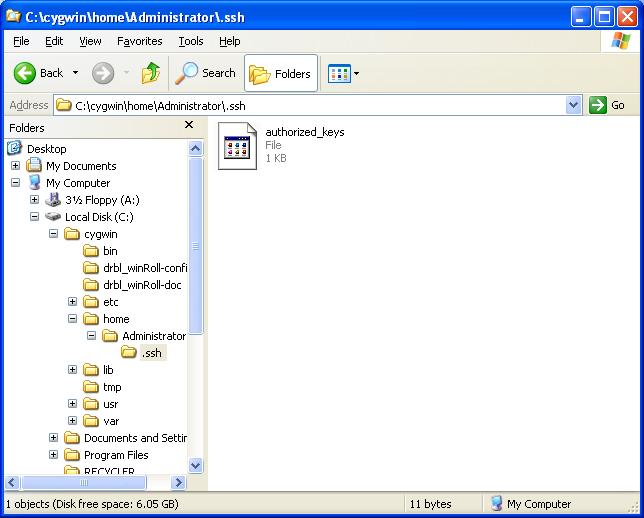
Store public key in c:\cygwin\home\administrator\.ssh named as "authorized_keys"
$ ssh administrator@[win-client-ip]
ipconfig
Note :
Description: A easy toolkit to send commands from windows client to server
Description: Windows user desktop recover tool. More detail please read inside document.
DRBL-Winroll is powered by Free Software Lab , NCHC, Taiwan